
Instructions to use MBZUAI-LLM/SlimPajama-DC with libraries, inference providers, notebooks, and local apps. Follow these links to get started.
- Libraries
- Transformers
How to use MBZUAI-LLM/SlimPajama-DC with Transformers:
# Use a pipeline as a high-level helper from transformers import pipeline pipe = pipeline("text-generation", model="MBZUAI-LLM/SlimPajama-DC", trust_remote_code=True)# Load model directly from transformers import AutoModelForCausalLM model = AutoModelForCausalLM.from_pretrained("MBZUAI-LLM/SlimPajama-DC", trust_remote_code=True, dtype="auto") - Notebooks
- Google Colab
- Kaggle
- Local Apps
- vLLM
How to use MBZUAI-LLM/SlimPajama-DC with vLLM:
Install from pip and serve model
# Install vLLM from pip: pip install vllm # Start the vLLM server: vllm serve "MBZUAI-LLM/SlimPajama-DC" # Call the server using curl (OpenAI-compatible API): curl -X POST "http://localhost:8000/v1/completions" \ -H "Content-Type: application/json" \ --data '{ "model": "MBZUAI-LLM/SlimPajama-DC", "prompt": "Once upon a time,", "max_tokens": 512, "temperature": 0.5 }'Use Docker
docker model run hf.co/MBZUAI-LLM/SlimPajama-DC
- SGLang
How to use MBZUAI-LLM/SlimPajama-DC with SGLang:
Install from pip and serve model
# Install SGLang from pip: pip install sglang # Start the SGLang server: python3 -m sglang.launch_server \ --model-path "MBZUAI-LLM/SlimPajama-DC" \ --host 0.0.0.0 \ --port 30000 # Call the server using curl (OpenAI-compatible API): curl -X POST "http://localhost:30000/v1/completions" \ -H "Content-Type: application/json" \ --data '{ "model": "MBZUAI-LLM/SlimPajama-DC", "prompt": "Once upon a time,", "max_tokens": 512, "temperature": 0.5 }'Use Docker images
docker run --gpus all \ --shm-size 32g \ -p 30000:30000 \ -v ~/.cache/huggingface:/root/.cache/huggingface \ --env "HF_TOKEN=<secret>" \ --ipc=host \ lmsysorg/sglang:latest \ python3 -m sglang.launch_server \ --model-path "MBZUAI-LLM/SlimPajama-DC" \ --host 0.0.0.0 \ --port 30000 # Call the server using curl (OpenAI-compatible API): curl -X POST "http://localhost:30000/v1/completions" \ -H "Content-Type: application/json" \ --data '{ "model": "MBZUAI-LLM/SlimPajama-DC", "prompt": "Once upon a time,", "max_tokens": 512, "temperature": 0.5 }' - Docker Model Runner
How to use MBZUAI-LLM/SlimPajama-DC with Docker Model Runner:
docker model run hf.co/MBZUAI-LLM/SlimPajama-DC
SlimPajama-DC

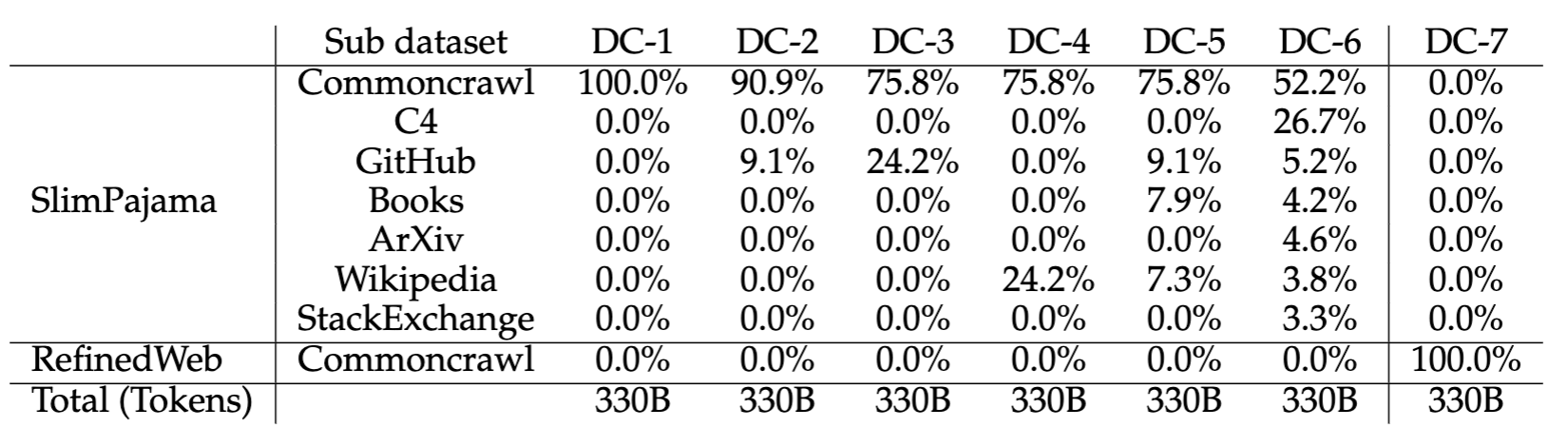
SlimPajama-DC is a set of 1.3B parameter language models, distinctively trained on the different combinations of 330B subsets of SlimPajama dataset.
| Details of Dataset Combinations for Different Models |
|---|
Despite being trained on a smaller amount of 330B tokens compared to TinyLlama and Olmo's 3 trillion, SlimPajama-DC surpasses TinyLlama and Olmo in some challenging English tasks.
| Our tests comprise: (1) AI2 Reasoning Challenge (25-shot); (2) HellaSwag (10-shot); (3) MMLU (5-shot); (4) TruthfulQA (0-shot) |
|---|

‡ represents the RefinedWeb CC.
| Performance on More Benchmarks |
|---|

ARC easy and ARC challenge are evaluated using 25-shot. All other evaluation benchmarks are tested on 0-shot. * represents the results are averaged across multiple sub-items inside each benchmark dataset.
Dataset
Our full dataset is available at SlimPajama-627B-DC.
Model Usage
To load a specific checkpoint, use the revision argument as shown below, for example, SlimPajama-DC-6. All the revisions can be seen from the branch dropdown in the "Files and versions" tab. If no revision argument is provided, it will load the default checkpoint SlimPajama-DC-6.
from transformers import AutoModelForCausalLM, AutoTokenizer
tokenizer = AutoTokenizer.from_pretrained(
"MBZUAI-LLM/SlimPajama-DC",
revision="SlimPajama-DC-6",
trust_remote_code=True
)
model = AutoModelForCausalLM.from_pretrained(
"MBZUAI-LLM/SlimPajama-DC",
revision="SlimPajama-DC-6",
trust_remote_code=True
)
prompt = 'int add(int x, int y) {'
input_ids = tokenizer(prompt, return_tensors="pt").input_ids
gen_tokens = model.generate(input_ids, do_sample=True, max_length=400)
print("-"*20 + "Output for model" + 20 * '-')
print(tokenizer.batch_decode(gen_tokens)[0])
Citation
BibTeX:
@article{shen2023slimpajama,
title={Slimpajama-dc: Understanding data combinations for llm training},
author={Zhiqiang Shen, Tianhua Tao, Liqun Ma, Willie Neiswanger, Zhengzhong Liu, Hongyi Wang, Bowen Tan, Joel Hestness, Natalia Vassilieva, Daria Soboleva, Eric Xing},
journal={arXiv preprint arXiv:2309.10818},
year={2023}
}
- Downloads last month
- 54