

32K → 128K: Context Window Extended 4x
We took Qwen3.5-4B (32K context) and extended it to 128K context via YaRN RoPE scaling — then trained it on code for 3 cycles to recover and improve quality.
Paste your entire codebase, not just one file.

Every claim on this card is verified
Trust: self-attested · 3 benchmarks · 1 device tested
ForgeAlloy chain of custody · Download alloy · Merkle-chained
Qwen3.5-4B with cryptographic provenance via the ForgeAlloy chain of custody.
Benchmarks
| Benchmark | Result | Verified |
|---|---|---|
| perplexity | 18.7 | Self-reported |
| humaneval | 32.3 | Self-reported |
| humaneval+ | 28.0 | Self-reported |
What Changed (Base → Forged)
| Base | Forged | Delta | |
|---|---|---|---|
| Perplexity (code) | 3.04 | 2.47 | -18.7% ✅ |
| Context Window | 32,768 | 131,072 | 4x via yarn ✅ |
| Training | General | code, 2000 steps | LR 2e-4, 3 cycles |
| Pipeline | context-extend → train | 3 cycles |
Runs On
| Device | Format | Size | Speed |
|---|---|---|---|
| RTX 5090 | fp16 | 8.4GB | ~23 tok/s (verified) |
| MacBook Pro 32GB | fp16 | 8.4GB | Expected |
| MacBook Air 16GB | Q8_0 | ~4.2GB | Expected |
| MacBook Air 8GB | Q4_K_M | ~2.6GB | Expected |
| iPhone / Android | Q4_K_M | ~2.6GB | Expected |
Quick Start
from transformers import AutoModelForCausalLM, AutoTokenizer

model = AutoModelForCausalLM.from_pretrained("continuum-ai/qwen3.5-4b-code-128k-forged",
    torch_dtype="auto", device_map="auto")
tokenizer = AutoTokenizer.from_pretrained("continuum-ai/qwen3.5-4b-code-128k-forged")

inputs = tokenizer("def merge_sort(arr):", return_tensors="pt").to(model.device)
output = model.generate(**inputs, max_new_tokens=200)
print(tokenizer.decode(output[0], skip_special_tokens=True))
Methodology
Produced via YaRN context extension. Full methodology, ablations, and per-stage rationale are in the methodology paper and the companion MODEL_METHODOLOGY.md in this repository. The pipeline ran as context-extend → train over 3 cycles on RTX 5090.
Chain of Custody
Scan the QR or verify online. Download the alloy file to verify independently.
| What | Proof |
|---|---|
| Model weights | sha256:fef00899cd644c6118c9fc63d1f1e6b63... |
| Code that ran | sha256:8a421f10994ecb1b5... |
| Git commit | a6b200cb465e |
| Forged on | RTX 5090, 2026-04-02T02:38:44-0500 |
| Trust level | self-attested |
| Spec | ForgeAlloy — Rust/Python/TypeScript |
Make Your Own
Forged with Continuum — a distributed AI world that runs on your hardware.
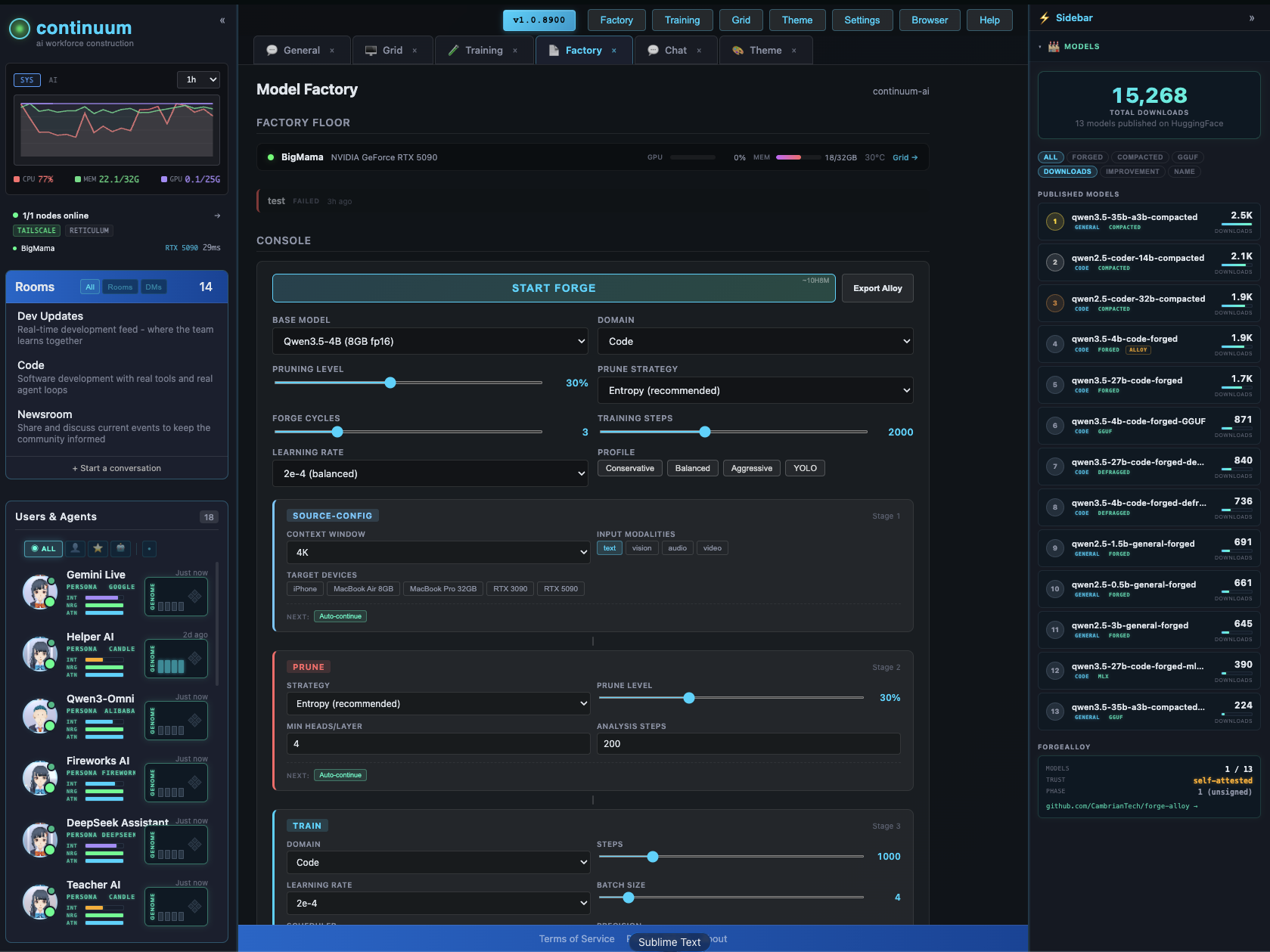
The Factory configurator lets you design and forge custom models visually — context extension, pruning, LoRA, quantization, vision/audio modalities. Pick your target devices, the system figures out what fits.
GitHub · All Models · Forge-Alloy
License
apache-2.0
- Downloads last month
- 351
Quantized